Beat ATS filters in 2026 with 9 proven resume fixes. Learn what scanners reject, how to optimize fast, and get more interviews.
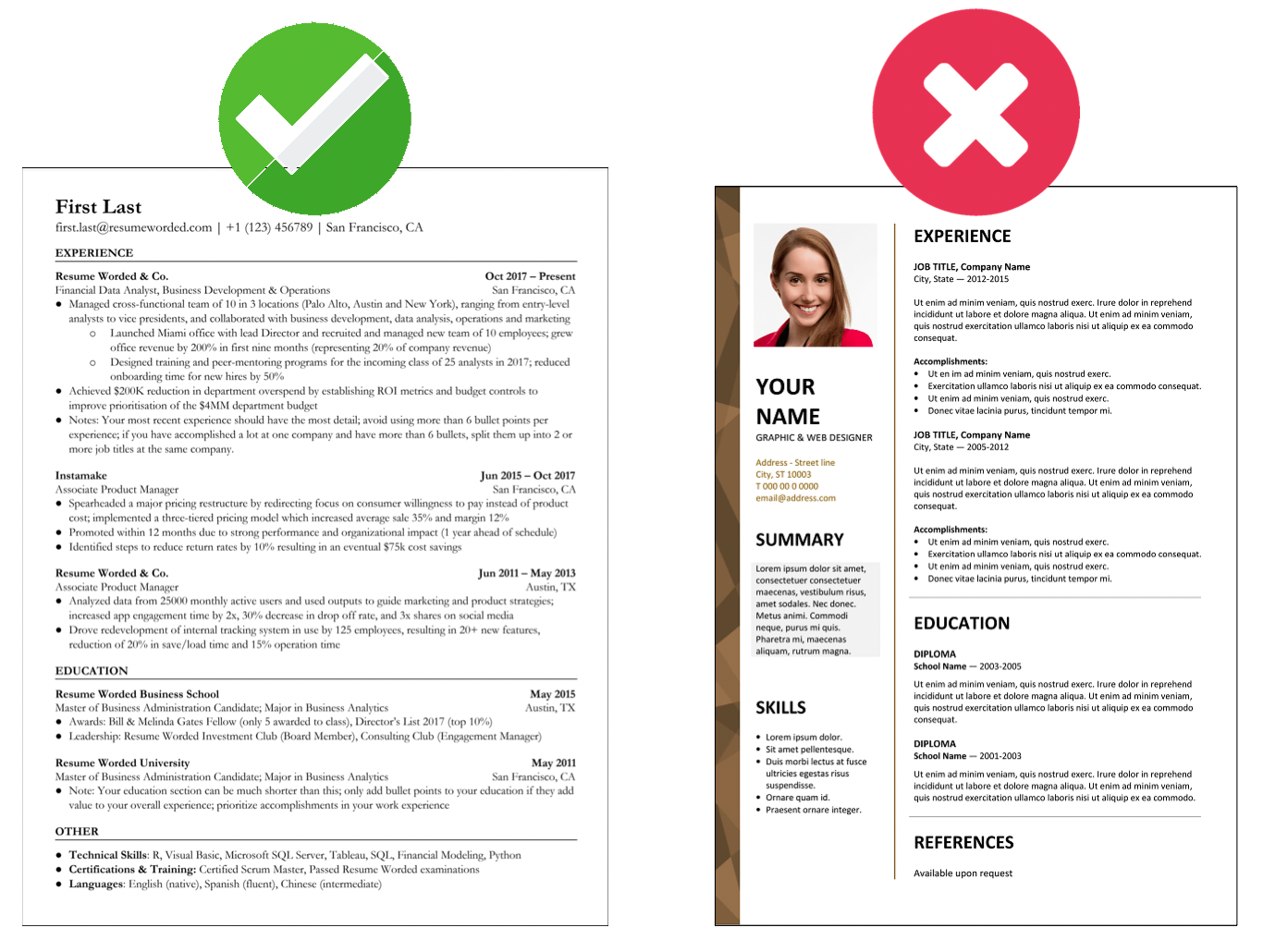
87% of resumes are rejected before a recruiter reads a word. To beat ATS filters in 2026, you need more than a pretty resume. You need a document machines can parse, score, and pass.
Most job seekers still lose on the basics.
Wrong file type. Fancy layout. Missing keywords. Job titles that sound clever but say nothing. Then they wonder why silence follows.
I’ve reviewed enough resumes to spot the pattern in under 30 seconds. The people getting interviews are not always more qualified. They’re just easier for the system to understand.
What are ATS filters in 2026?
ATS filters are screening rules inside applicant tracking systems that parse, rank, and sort resumes before a human reviews them. In 2026, they don’t just scan for keywords. They also read structure, job-title alignment, skills context, dates, seniority signals, and sometimes knockout questions.
That last part matters.
An ATS is not a robot recruiter with feelings. It’s closer to airport security. If your bag looks messy, unclear, or suspicious, you get pulled aside. Not because you’re bad. Because you’re hard to process.
According to Jobscan’s 2025 recruiter survey, more than 98% of Fortune 500 companies use an ATS. LinkedIn reported in 2026 that application volume per corporate role remained above 250 applicants on average in many white-collar sectors. And per a 2026 Greenhouse hiring trends report, recruiters spend only a few seconds on the first pass once a resume reaches their screen.
So yes, the filter matters.
Why resumes fail ATS scans even when you’re qualified
This is where it gets interesting.
Most ATS failures are not about lack of experience. They’re about translation. You know what you’ve done. The software doesn’t.
Here are the biggest reasons good resumes get filtered out:
- Missing exact-match keywords from the job description
- Job titles that don’t match market language
- Tables, text boxes, columns, icons, and graphics that break parsing
- Skills listed without context in work experience
- Wrong section headings like “My Journey” instead of “Experience”
- Date formatting issues that confuse tenure calculations
- Overstuffed keyword blocks that look manipulative
- Applying with one generic resume to 50 different roles
According to a 2025 Resume Genius hiring study, 63% of recruiters said resumes often fail because they don’t clearly match the target role. Not because the person is unqualified. Because the resume doesn’t make the match obvious.
That’s brutal. But it’s fixable.
How to beat ATS filters in 2026, step by step
If you want a practical system, use this one.
1. Start with the exact job description
Don’t write your resume from memory. Write it against the posting.
Print the job ad. Or paste it into a doc. Then highlight:
- Repeated skills
- Required tools
- Certifications
- Industry terms
- Job title variations
- Seniority words like lead, manager, senior, specialist
If a phrase shows up three times, it matters.
Your resume should mirror the language of the target role without sounding copied. That’s how you improve relevance scoring.
2. Match the job title if it’s honest
Let’s say your actual title was “Customer Happiness Ninja.” Cute. ATS systems hate cute.
If you did customer support work, write this instead:
Customer Support Specialist
Official title: Customer Happiness Ninja
That keeps you truthful while using the language recruiters and systems recognize.
I’ve seen this one change lift response rates fast, especially in startups where titles get weird.
3. Use a clean, parseable format
In practice, simple wins.
Use:
- One column
- Standard fonts like Arial, Calibri, Helvetica, Georgia
- Clear headings: Summary, Experience, Skills, Education, Certifications
- Bullet points, not dense paragraphs
- Dates in a consistent format
Avoid:
- Text boxes
- Tables
- Logos
- Icons for phone, email, LinkedIn
- Headers and footers for critical information
- Graphics-based skill bars
Here’s a quick rule: if your resume looks like a design portfolio, it may be unreadable to the ATS.
4. Put keywords in the right places
Keyword stuffing is lazy. Placement matters more.
The strongest locations are:
1. Headline or summary 2. Skills section 3. Recent work experience 4. Project descriptions 5. Certifications
Bad example:
- SEO, SEO, SEO, content, content strategy, analytics, Google Analytics, SEO
Better example:
- Led SEO content strategy for a B2B SaaS site, increasing non-brand organic traffic by 42% in 9 months using Google Analytics and Search Console insights.
See the difference?
One looks like spam. The other proves competence.
5. Show evidence, not just duties
ATS systems increasingly score context. Recruiters definitely do.
So don’t write:
- Responsible for project management
- Helped with hiring
- Worked on marketing campaigns
Write:
- Managed 12 cross-functional software projects with a 96% on-time delivery rate
- Screened 180 applicants and coordinated 25 interviews in one quarter
- Built and launched 4 paid campaigns that cut cost per lead by 18%
Numbers are machine-friendly and human-friendly. They turn vague claims into signals.
6. Build a skills section that supports, not replaces, experience
A long skills block alone won’t save you.
If the posting asks for Salesforce, stakeholder management, pipeline reporting, and forecasting, those terms should appear in:
- Your skills section
- At least one recent role bullet
- Maybe your summary if the role depends on them
That repetition creates alignment.
Natural alignment. Not keyword wallpaper.
7. Answer knockout questions honestly
Many ATS setups in 2026 include screening questions before your resume is even scored.
Things like:
- Do you require sponsorship?
- Do you have 3+ years of Python experience?
- Are you located in New York?
- Do you hold a CPA license?
No resume trick fixes a knockout answer.
If you fail here, you’re out. That’s why job selection matters as much as resume optimization. Applying everywhere is not a strategy. It’s panic with Wi-Fi.
8. Save in the right file format
Usually: PDF or DOCX.
But read the instructions.
Some older systems still parse DOCX better. Some employers explicitly request PDF to preserve formatting. If nothing is specified, DOCX is often the safer ATS choice for plain-text compatibility, while a simple PDF can also work in modern systems.
The key is this: test the file after export. If text becomes scrambled when copied into a plain document, the ATS may struggle too.
9. Tailor every time
Yes, every time.
Not from scratch. That would be torture. But you should adapt the top third of your resume, the skills section, and a few bullets for each role.
A 2026 Talent Board candidate experience study found that highly targeted applications consistently outperformed mass applications on interview conversion. That tracks with what I see in real searches: fewer applications, better fit, more calls.
> 💡 Cubbbe Tip: Before you apply, run your resume through Resume Lab - CV Analysis to compare it against the job posting and spot missing keywords or formatting issues fast.
Which ATS resume format works best in 2026?
The best ATS resume format in 2026 is a reverse-chronological resume with one column, standard section headings, measurable achievements, and job-specific keywords placed naturally throughout. It is the easiest format for both parsing software and busy recruiters.
That’s the short answer.
Here’s the fuller picture.
Best format by goal
| Goal | Best choice | Why it works |
|---|---|---|
| Most corporate roles | Reverse-chronological | Clear timeline, easy parsing, recruiter-friendly |
| Career change | Hybrid, used carefully | Lets you surface transferable skills without hiding dates |
| Early career | Reverse-chronological | Shows internships, projects, and progression clearly |
| Freelancers/consultants | Reverse-chronological with project detail | Preserves timeline while proving scope |
|
What usually fails?
- Functional resumes with no clear dates
- Visual templates from design marketplaces
- Multi-column documents with sidebars
- “Creative” resumes that sacrifice clarity
Recruiters say they want personality. Fine. Give it through your achievements, not through a resume that breaks the software.
How many keywords should your resume include?
This question comes up constantly.
The honest answer: enough to show fit, not so many that you sound engineered.
A good target for a tailored resume is to include the core terms from the job description across these areas:
- Headline/summary
- Skills section
- 3-5 bullets in your most recent roles
- Certifications or tools section if relevant
You do not need to force every phrase.
If a job posting repeats “project management,” “Agile,” “stakeholder communication,” and “Jira,” make sure those appear where they’re true. But don’t jam “project management” into six bullets like you’re trying to bribe a scanner.
A simple keyword test
After tailoring, ask yourself:
- Would a recruiter instantly see I fit this role?
- Are the most important skills visible in the top half?
- Do my bullets prove the keywords, not just mention them?
- Does the wording sound like a real professional wrote it?
If the answer is no, keep editing.
A mini case study: one resume, two outcomes
Let me show you how this plays out.
A product marketing manager I coached had solid experience. Five years. Strong brands. Good results. But she had applied to 47 jobs and landed only 2 screening calls.
Her original resume had three problems:
- The headline said “Marketing Leader” instead of the target title
- The design used two columns and icons
- The bullets were polished but vague
One bullet read:
- Drove cross-functional go-to-market initiatives across product lines
Sounds smart. Says almost nothing.
We rewrote the resume for a Product Marketing Manager role.
Changes:
- Headline changed to Product Marketing Manager | GTM Strategy | SaaS
- Layout simplified to one column
- Skills aligned to the posting: positioning, messaging, competitive analysis, sales enablement, product launches
- Bullets rewritten with numbers and context
New bullet:
- Led go-to-market strategy for 3 SaaS product launches, enabling .8M in first-year pipeline and reducing sales ramp time by 22% through updated messaging and enablement content
Same person. Same career.
Different translation.
Over the next month, she sent 12 tailored applications and got 5 recruiter screens.
That’s the game. Not magic. Friction removal.
The ATS mistakes people still make in 2026
Some bad advice refuses to die.
Let’s kill a few myths.
Myth 1: White text keywords still work
No. Many systems flag hidden text. Recruiters also notice when resumes look manipulated after parsing.
It’s the resume equivalent of stuffing your jacket with answers before an exam. Desperate. Obvious. Risky.
Myth 2: The more applications, the better
Not if they’re weak matches.
A smarter approach is to target roles that fit your background and tailor for those. If you want help finding closer-fit openings first, Smart Job Board is useful because it surfaces jobs that better match your profile. That saves you from wasting tailored resumes on bad-fit roles.
Myth 3: AI-written resumes automatically beat ATS
Absolutely not.
AI can speed up drafting. It can also produce bland sludge full of generic verbs and fake-sounding phrasing. If your resume reads like a chatbot swallowed a corporate handbook, recruiters will smell it.
Use AI for structure and ideas. Then edit like a grown-up.
Myth 4: A summary is optional
It depends on your experience, but for many roles, a sharp summary helps both ATS and humans.
A good summary does three things fast:
- Names your target role
- Signals years or scope of experience
- Highlights 2-3 core strengths tied to the posting
Example:
Product analyst with 4 years of experience in SaaS, SQL reporting, experimentation, and dashboard development. Built self-serve reporting that cut stakeholder request volume by 35%.
That’s useful.
Myth 5: Once your resume is optimized, you’re done
You’re not.
Your job search is a system, not a single document.
If you’re applying to multiple roles, track which version of your resume went where. Otherwise you’ll never know what’s working. That’s where something like Application Tracking helps in a very practical way. You can see patterns instead of guessing in the dark.
How to tailor your resume in 15 minutes
You don’t need an all-night rewrite session every time.
Use this fast workflow.
The 15-minute ATS tailoring routine
1. Read the posting once for the big picture. What role is this really about? 2. Highlight 8-12 priority terms. Focus on skills, tools, certifications, and outcomes. 3. Update your headline and summary. Match the target role and top strengths. 4. Adjust your skills section. Move the most relevant terms higher. 5. Rewrite 3-5 bullets in recent roles. Add the exact language where it’s true. 6. Check formatting. One column, standard headings, no visual clutter. 7. Save with a clear file name. Example: Firstname_Lastname_ProductMarketingManager.docx 8. Preview as plain text. Make sure dates, bullets, and sections still make sense.
That’s it.
Do this consistently and your odds improve fast.
Not because you gamed the system. Because you made your value legible.
What recruiters see after the ATS passes you through
Here’s the part too many people forget.
Beating ATS filters is step one. Then a human shows up.
And humans are wonderfully unforgiving.
Once your resume gets through, recruiters usually scan for:
- Clear fit for the role
- Career progression
- Relevant achievements
- Stability or understandable movement
- Evidence you can do this job, not just a job
So your resume has to do both jobs:
- Speak machine
- Persuade a person
That’s why the best ATS resume never feels robotic. It feels clear.
Clear is powerful.
FAQ: How to beat ATS filters in 2026
Do ATS systems reject resumes automatically?
Yes, ATS systems can automatically screen out resumes based on knockout questions, missing qualifications, location rules, or poor keyword alignment. In many cases, the system ranks applicants first and recruiters review the top group, which means low-scoring resumes may never be seen.
Is PDF or DOCX better for ATS in 2026?
DOCX is often the safest choice for ATS compatibility, but a simple PDF also works in many modern systems. The real rule is to follow the employer’s instructions and avoid heavily designed files that break when parsed into plain text.
Can ATS read tables, columns, and graphics?
Some ATS platforms can handle basic columns, but many still struggle with tables, text boxes, icons, and graphics. If critical information sits inside those elements, it may be skipped, scrambled, or assigned to the wrong section.
How tailored does a resume need to be?
A resume should be tailored enough that the target role, core skills, and strongest matching achievements are obvious within seconds. You do not need a total rewrite, but you should adapt the title, summary, skills, and several recent bullets for each application.
Do keywords alone help you beat ATS filters?
No, keywords alone are not enough to beat ATS filters. Modern systems and recruiters both look for context, relevance, and evidence. A resume packed with terms but lacking clear achievements or role alignment usually underperforms.
The bottom line
ATS filters are not unbeatable. They’re just picky, literal, and unimpressed by fluff. If your resume is clear, tailored, and built around proof, you give both the software and the recruiter a reason to keep reading.
That’s the real goal.
Not to trick the system. To remove every dumb obstacle between you and the interview. How many of those obstacles are still sitting in your resume right now?
Ready to land your dream job? Start building your perfect CV with AI-powered analysis.